Kalay Mobile Datasheet
Kalay Mobile
Your Kalay Cloud VMS, in your pocket. The companion mobile app for iOS and Android.
Kalay Mobile is the companion mobile application for Kalay Cloud VMS. It gives Client Main and Client Sub users full remote access to live camera feeds, event playback, push notifications, and device management --- all from the same account with zero additional configuration. Log in with your Kalay Cloud VMS credentials and start monitoring immediately.
- Same account, zero setup --- log in with your Kalay Cloud VMS credentials instantly
- Real-time push notifications for motion, human, vehicle, loiter detection, and more
- Live view with two-way audio, PTZ control, screenshot, and recording
- Event playback with timeline scrubbing, pinch-zoom, and event type filtering
- Add devices on-site via QR code scanning --- no laptop needed
- Available on iOS 14.0+ and Android 12.0+
How It Fits Together
Section titled “How It Fits Together”Kalay Mobile connects through the Kalay Cloud VMS platform, which provides the full cloud backend for live streaming, cloud recording, device management, account management, push notifications, and Cloud AI. IP cameras with TUTK Agent built inside connect to the platform on one side; Kalay Mobile on iOS/Android provides the client interface on the other.
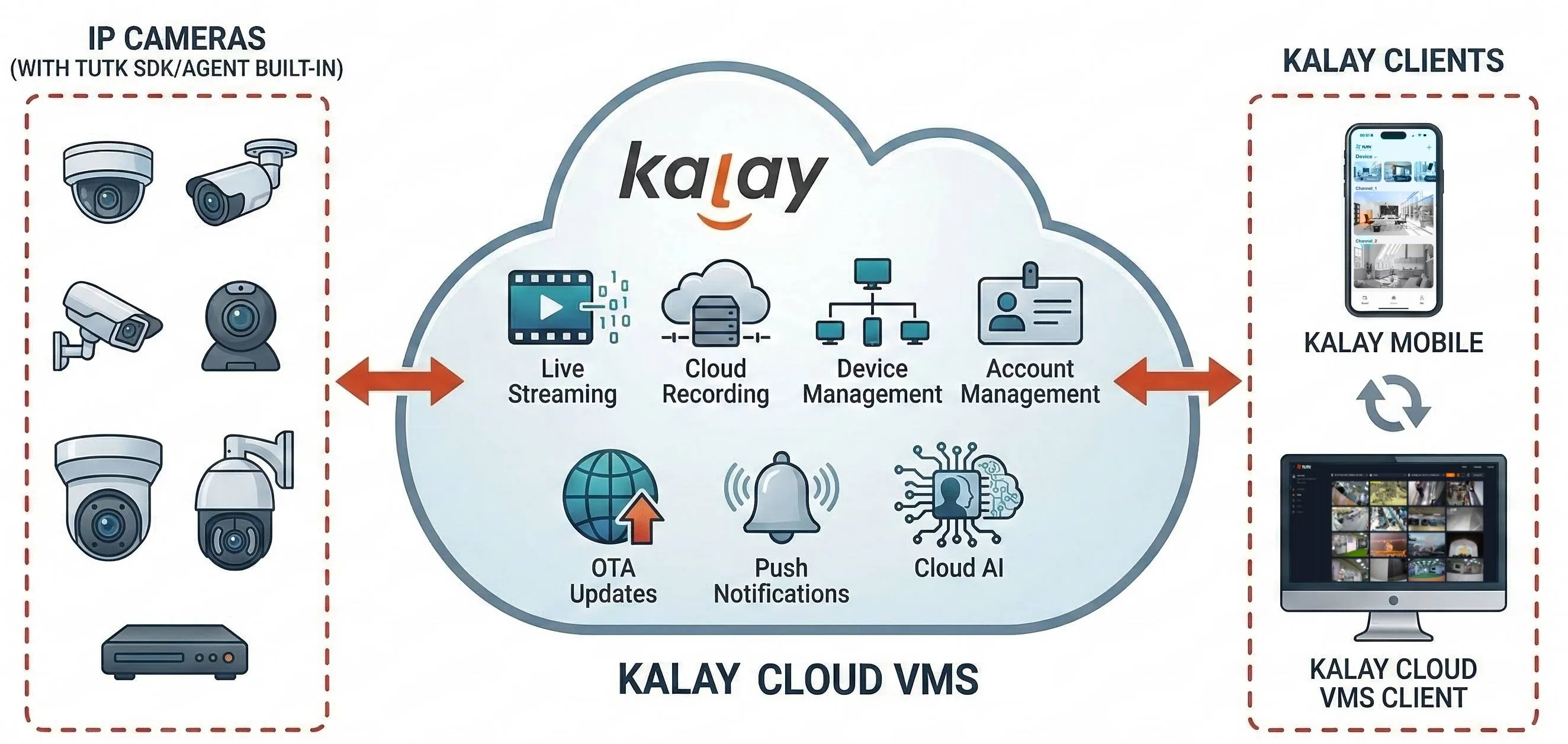
Figure: Kalay platform architecture --- IP cameras with TUTK Agent (left), Kalay Cloud VMS platform with core services (center), Kalay Mobile on iOS/Android (right)
Product Experience
Section titled “Product Experience”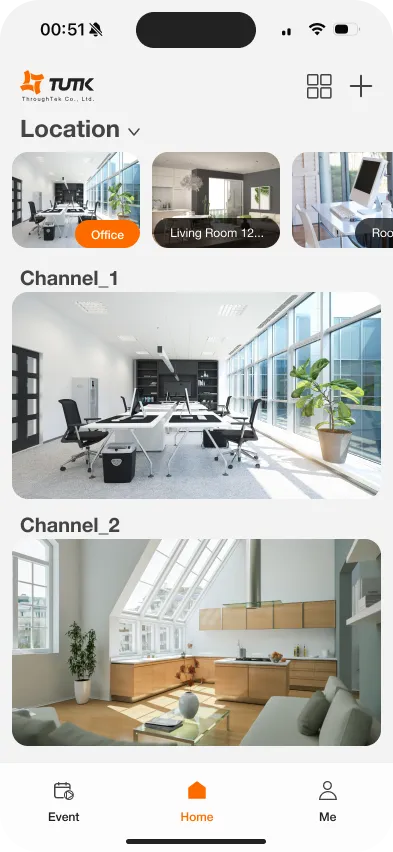
Home --- Device/Location view
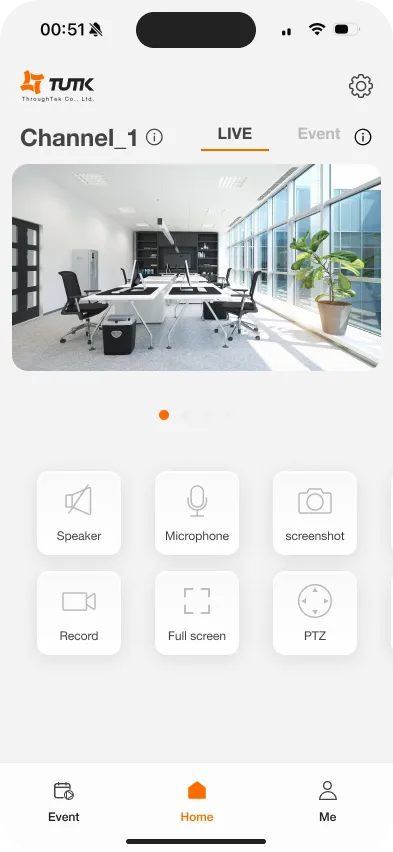
Live View --- Controls & PTZ
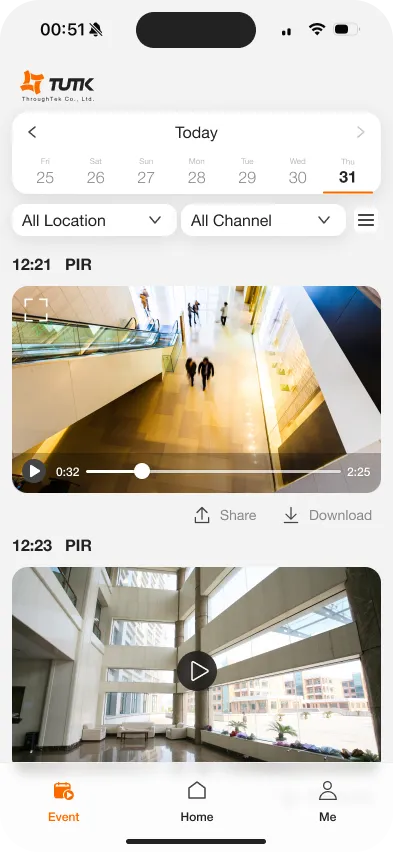
Events --- Filter & playback
Feature Overview
Section titled “Feature Overview”| Feature | Detail |
|---|---|
| Live View | Single channel with swipe navigation between channels. Multi-channel split-screen (up to 4 in landscape). Portrait and landscape orientation. Auto-play on first visible channel. |
| Live View Controls | Speaker (audio toggle), Microphone (two-way audio), Screenshot (capture frame), Record (save to device), Full Screen (landscape), PTZ (pan/tilt/zoom for supported devices). |
| Event Management | View, filter, playback, share, and download event clips. Filter by date (30 days), Location/Device, Channel, and event type (Human, Vehicle, PIR, Loiter Detection, etc.). |
| Timeline Playback | Visual timeline with colored event segments. Drag to scrub, pinch to zoom (1 min / 5 min / 15 min intervals). Previous/Next event navigation. Date picker up to 30 days back. |
| Push Notifications | Enabled by default for all channels. Per-channel toggle (on/off). Shows event type and channel name. Tap to jump directly to live view of that channel. |
| Device Management | Add devices via QR code scanning or WiFi QR code generation. View device/channel info, firmware version, cloud recording status, storage capacity. Reload or delete devices (Main account only). |
| Event Sharing | Generate shareable links for cloud events. Recipients view in browser without installing the app. Copy or send via email, messaging apps, or social media. |
| View Modes | Location Mode (channels grouped by location) or Device Mode (channels grouped by device). Switch via dropdown on Home screen. Pull-down to refresh all channels. |
| Account | View account info, manage notification preferences, log out. Permissions inherited from Kalay Cloud VMS --- no separate configuration needed. |
Permission Matrix
Section titled “Permission Matrix”Kalay Mobile supports Client Main and Client Sub accounts. Permissions are inherited from Kalay Cloud VMS.
| Function | Client Main | Client Sub |
|---|---|---|
| Device Management | Create / Read / Delete | Read / Update |
| Live Views | ✓ | ✓ |
| Event Access & Playback | ✓ | ✓ |
| Push Notifications | ✓ | ✓ |
| Alerts Configuration | ✓ | ✓ |
| Cloud Recording Status | View | View |
| Account Management | View | View |
| Add / Delete Device | ✓ | --- |
| Reload Device | ✓ | --- |
Key Product Differentiators
Section titled “Key Product Differentiators”1. Seamless Cloud VMS Integration
Section titled “1. Seamless Cloud VMS Integration”Same account, same permissions, same devices --- zero additional configuration. Log in with your Kalay Cloud VMS credentials and everything syncs automatically. Alert configurations, device assignments, and cloud recording plans are always in sync between web and mobile.
2. Intuitive User Experience
Section titled “2. Intuitive User Experience”Familiar swipe-based live view interface reduces learning curve. QR code device binding enables on-site installation without a laptop. Location and Device view modes let users organize channels the way they work.
3. Enhanced Productivity
Section titled “3. Enhanced Productivity”Real-time push notifications with per-channel toggle give operators instant awareness. Timeline playback with pinch-zoom scrubbing enables fast incident review. Multi-channel split-screen provides situational awareness across up to 4 cameras simultaneously.
4. Hardware Independent
Section titled “4. Hardware Independent”Compatible with any TUTK-enabled camera or recorder from any manufacturer. No vendor lock-in --- freely mix brands and device types.
Next Step
Section titled “Next Step”Request app access --- contact your TUTK sales representative to get started with Kalay Mobile. Provide your organization details and Apple ID email (iOS) or request the Android APK.
Version History
Section titled “Version History”| Date | Description | Author |
|---|---|---|
| 2025/11/19 | Kalay Mobile Datasheet v1.0 | Emma |
| 2026/03/20 | Add product narrative, app screenshots, feature detail table | Louis |