Kalay Cloud VMS Datasheet
Kalay Cloud VMS
White-label cloud video management for flexible hardware, practical AI, and multi-site operations.
Kalay Cloud VMS helps camera brands, service providers, and distributed operators launch and manage cloud video services under their own brand. It combines flexible device connection paths, centralized cloud operations, and edge-plus-cloud intelligence to support real-world deployments across multiple customers, sites, and teams.
- Launch a branded cloud video service faster with white-label customization
- Reduce deployment friction with native and bridge-based hardware paths
- Support multi-site operations with centralized visibility, playback, and alerts
- Apply AI at the edge, in the cloud, or in a blended model based on deployment needs
- Monitor from anywhere via web browser and the Kalay Mobile companion app (iOS/Android)
Architecture Overview
Section titled “Architecture Overview”Kalay Cloud VMS is designed around three practical deployment principles:
- Path A --- Legacy Camera + AI Box: connect legacy cameras through an AI Box for edge intelligence and cloud connectivity.
- Path B --- IP Camera / NVR with TUTK Agent: native P2P connection for TUTK-enabled devices --- the simplest deployment path. (Recommended by TUTK)
- Path C --- ONVIF via Kalay Cloud Bridge: extend compatibility to third-party ONVIF cameras through bridge-based expansion.
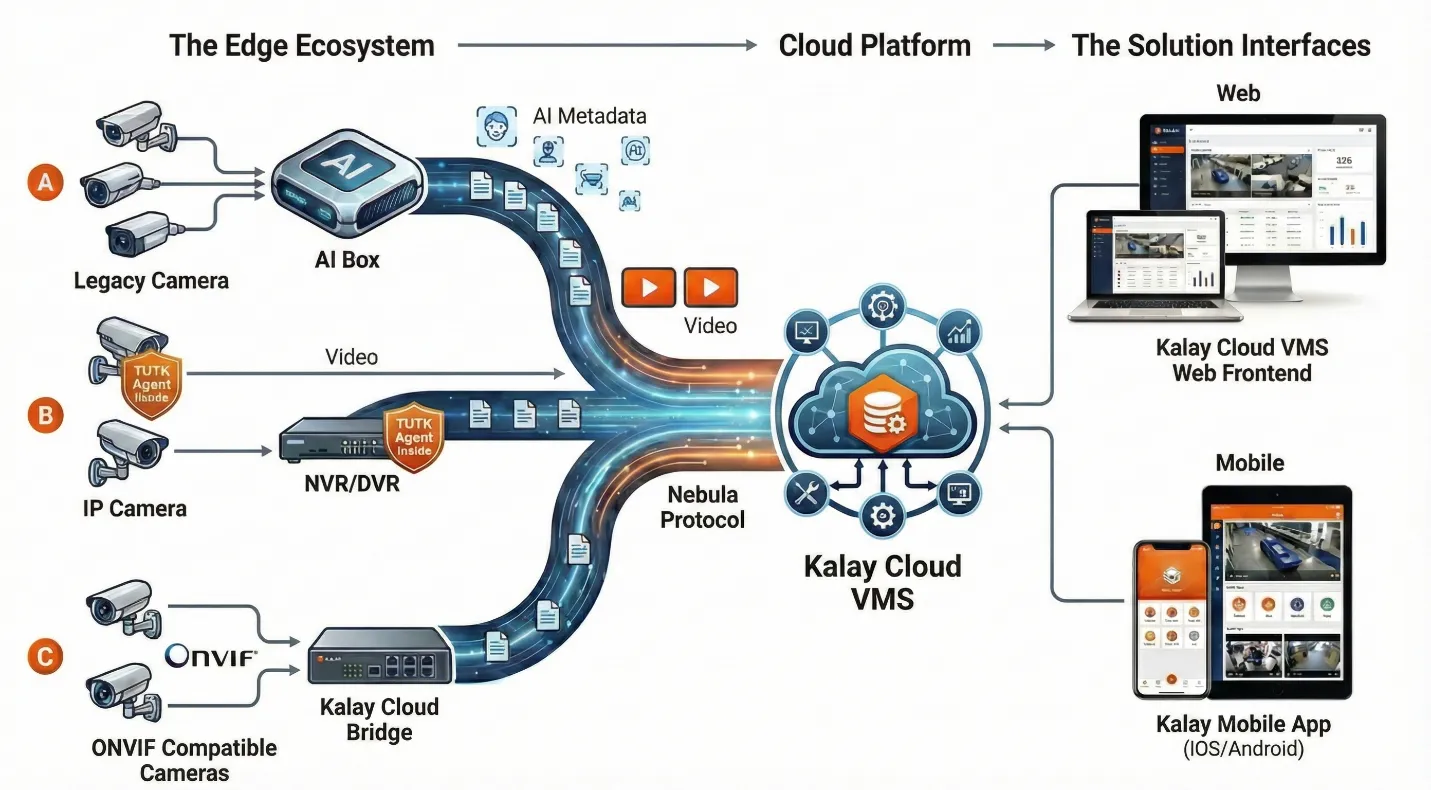
Figure: Kalay Cloud VMS architecture --- Edge Ecosystem, Cloud Platform, and Solution Interfaces (Web + Mobile)
Key Product Differentiators
Section titled “Key Product Differentiators”1. P2P Technology for Optimal Performance
Section titled “1. P2P Technology for Optimal Performance”Direct device connections reduce bandwidth costs and deliver faster streaming with TUTK’s proven P2P technology, with automatic relay fallback for guaranteed connectivity.
2. Fully White-Label Ready
Section titled “2. Fully White-Label Ready”Complete branding customization with logos, themes, custom URLs, and SSL support. Deliver cloud video services under your own brand across multiple partners and customers.
3. Hardware Independent
Section titled “3. Hardware Independent”Compatible with any TUTK-enabled camera or recorder from any manufacturer. Bridge-based expansion supports ONVIF devices with no vendor lock-in.
4. Practical Edge + Cloud AI
Section titled “4. Practical Edge + Cloud AI”Choose analytics at the device edge, in the cloud, or across both layers. Match AI deployment to bandwidth conditions, operational goals, and cost targets instead of locking into a single model.
Solution Interfaces
Section titled “Solution Interfaces”Kalay Cloud VMS provides two complementary interfaces for complete operational coverage:
| Kalay Cloud VMS (Web) | Kalay Mobile (iOS / Android) | |
|---|---|---|
| Primary Use | Full platform management, multi-site monitoring, admin operations | Remote monitoring, push alerts, field verification, on-the-go access |
| Live View | 1/4/9/16 grid, Location/Group/Channel filters, WebRTC streaming | Up to 4 channels split-screen, swipe navigation, landscape mode |
| Events | View, filter, playback, share, download event clips | View, filter, playback, share, download + timeline scrubbing |
| Alerts | Email, LINE, browser push notifications | Native push notifications (enabled by default) |
| Device Mgmt | Add (QR/WiFi QR/Barcode), configure, monitor, floor plans | Add (QR Scan/WiFi QR), view settings, reload/delete |
| Recording | Cloud event + fulltime recording, local SD/HDD, schedule config | View cloud recording status, timeline playback with pinch-zoom |
| Admin | Dealer/Client/Technician management, sub-accounts, license allocation | Account view, notification preferences, per-channel toggle |
| Browser/OS | Chrome / Edge recommended | iOS 14.0+ / Android 12.0+ |
Permission Matrix
Section titled “Permission Matrix”| Function | Vendor | Dealer | Technician | Client Main | Client Sub |
|---|---|---|---|---|---|
| Dashboard | ✓ | ✓ | --- | ✓ | ✓ |
| Dealer Management | CRUD | --- | --- | --- | --- |
| Client Management | Read | CRUD | --- | --- | --- |
| Technician Management | --- | CRUD | --- | --- | --- |
| Device Management | Read | Read | CRUD | CRUD | Read |
| Live Views | --- | --- | --- | ✓ | ✓ |
| Event Access | --- | --- | --- | ✓ | ✓ |
| Alerts Configuration | --- | --- | --- | ✓ | ✓ |
| Account Management | --- | --- | --- | CRUD | View |
| Cloud Recording | --- | --- | Subscribe | Subscribe | View |
| License Allocation | CRUD | CRUD | --- | --- | --- |
| Kalay Mobile Access | --- | --- | --- | Full | View |
Best-Fit Customers and Use Cases
Section titled “Best-Fit Customers and Use Cases”- Camera brands building a white-label cloud video offering
- Telecom, ISP, and managed service providers launching recurring video services
- Distributors, resellers, and channel-led solution providers supporting multiple customer environments
- Multi-site retail, restaurant, franchise, property, and facility operators that need centralized monitoring
- Cost-aware cloud video projects, especially those focused on event-driven recording models
Technical Specifications
Section titled “Technical Specifications”Video Streaming
Section titled “Video Streaming”| Specification | Detail |
|---|---|
| Primary Streaming | WebRTC (P2P mode) |
| Fallback Streaming | relay mode via Ceres service |
| Stream Types | Main-stream and sub-stream support (default: sub-stream when available) |
| Video Codecs | H.264, H.265/HEVC (mobile & Chrome browser) |
| Audio Codecs | G711 (PCMA/PCMU), AAC (mobile) |
Storage and Recording
Section titled “Storage and Recording”| Feature | Detail |
|---|---|
| Local Recording | SD card / HDD with status monitoring and formatting |
| Cloud Event Recording | Event-triggered cloud storage with configurable retention |
| Cloud Fulltime Recording | Continuous cloud recording with configurable retention |
Supported Protocols
Section titled “Supported Protocols”- TUTK P2P protocol
- Kalay Cloud Connect remote access service
- WebRTC streaming
- ONVIF (via Kalay Cloud Bridge)
Role-Based Value Summary
Section titled “Role-Based Value Summary”| Role | Key Capabilities | Business Value |
|---|---|---|
| Vendor | Dealer network management, license allocation, white-label branding, ecosystem metrics | Scalable multi-tier business model with centralized control and flexible revenue distribution |
| Dealer | Client provisioning, Technician dispatch, task tracking, resource allocation to Clients | Complete client lifecycle management with recurring revenue through cloud services |
| Technician | Multi-method device addition (QR/WiFi QR/Barcode), on-site verification, installation completion | Faster deployment with built-in verification to prevent callbacks |
| Client Main | Multi-method device addition (QR/WiFi QR/Barcode), Live view, event playback, AI analytics, sub-account management, alerts, cloud recording, mobile access | Professional multi-camera monitoring with flexible team delegation and 14+ AI event types |
| Client Sub | Scoped live view, event access, personal alert preferences, mobile push notifications | Delegated view-only access to assigned devices for team-level daily monitoring |
Next Step
Section titled “Next Step”Book a demo or discuss a proof of concept to review supported deployment models, white-label options, and the right fit for your device, channel, and operational requirements.
Version History
Section titled “Version History”| Date | Description | Author |
|---|---|---|
| 2025/11/12 | Kalay Cloud VMS Datasheet v1.0 | Jonas Chen |
| 2025/11/14 | Add Key Product Differentiators | Jonas Chen |
| 2026/03/20 | Add Kalay Mobile | Louis/Jonas Chen |